Notifications
Clear all
Modern Survival Horror Framework
28
Posts
9
Users
28
Reactions
431
Views

02/11/2026 6:48 pm
So, I have to recreate my character, animation, slots and items every time? Until v1.0,
How do I transfer my new weapon and character correctly?
What will happen after version Until v1.0,?
Will it be updated differently?
and when approximately will Until v1.0 be released?

02/11/2026 10:39 pm
@g-scairp Unreal has a Migrate feature for all Uassets within a project. If you have 2 projects you can right click a Uasset in Project A, go to "Asset Actions" and choose "Migrate" under that. It'll pull up a window showing everything that uses that asset or is being used by that asset. You can check things on or off as needed. Once you make your selection you can use the folder view that pops up to navigate to the content folder of Project B. Once you finalize that it'll copy everything over to that project.
I've been able to do that between 5.0 projects without issue. Not sure how newer versions would react but I imagine most things would be fine. If you start grabbing the core gameplay stuff things would get wonky so I'd definitely make sure you're only grabbing the assets you want.
@hosna Are there any compatibility issues between 5 and 6 with any of the current low level assets like doors, saves, items, etc?

Topic starter
03/11/2026 12:59 pm
@g-scairp If the systems you've created are in separate, independent classes that don't rely on modified framework systems, you can manually migrate them to the latest version after downloading a fresh copy. For now, this is the only available approach.
However, after v1.0, we'll introduce a dedicated DIY section on our website... This will allow you to apply future updates to your existing project by following step-by-step instructions, without having to download a fresh version and migrate everything again.
The good news is that the next update after v0.6 will be v1.0, so we're not far from reaching that milestone!
Scairp reacted
Topic starter
03/11/2026 1:06 pm
@chewchewlazergum Yes, but you need to handle this process carefully. When migrating assets from an older project to a newer version, make sure they don't overwrite any updated or modified framework files. Otherwise, this could lead to errors and compatibility issues.
That's why we've always recommended keeping your custom systems as modular and independent as possible, preferably in separate folders... This makes upgrading to newer versions much easier until v1.0 arrives.
And yes, some systems have changed in v0.6, so you should be especially careful not to overwrite those updated files.
However... individual assets such as character meshes, 3D models, animations, sounds, and similar content can generally be migrated into the new project without issues, as long as their dependencies are handled correctly 😊
Scairp reacted
03/11/2026 6:24 pm
I'll wait for version 1.0, thanks.@g-scairp Unreal has a Migrate feature for all Uassets within a project. If you have 2 projects you can right click a Uasset in Project A, go to "Asset Actions" and choose "Migrate" under that. It'll pull up a window showing everything that uses that asset or is being used by that asset. You can check things on or off as needed. Once you make your selection you can use the folder view that pops up to navigate to the content folder of Project B. Once you finalize that it'll copy everything over to that project.
I've been able to do that between 5.0 projects without issue. Not sure how newer versions would react but I imagine most things would be fine. If you start grabbing the core gameplay stuff things would get wonky so I'd definitely make sure you're only grabbing the assets you want.
@hosna Are there any compatibility issues between 5 and 6 with any of the current low level assets like doors, saves, items, etc?
Hosna reacted
03/11/2026 6:28 pm
I'll wait until version 1.0 and transfer my character from CC5 there. Thanks.@chewchewlazergum Yes, but you need to handle this process carefully. When migrating assets from an older project to a newer version, make sure they don't overwrite any updated or modified framework files. Otherwise, this could lead to errors and compatibility issues.
That's why we've always recommended keeping your custom systems as modular and independent as possible, preferably in separate folders... This makes upgrading to newer versions much easier until v1.0 arrives.
And yes, some systems have changed in v0.6, so you should be especially careful not to overwrite those updated files.
However... individual assets such as character meshes, 3D models, animations, sounds, and similar content can generally be migrated into the new project without issues, as long as their dependencies are handled correctly 😊

03/11/2026 10:42 pm
@hosna Do you also plan to develop a system for combining items, similar to the one in the Silent Hill 2 remake?
It would be great to add the ability to combine story‑related items that require more than two elements. For example, in SH2 we needed to glue together a music record. The music record consisted of two parts (2 items) and glue (3 items to combine in total).
This post was modified 1 week ago by RozhkovskyProduction
Hosna reacted
03/11/2026 10:51 pm
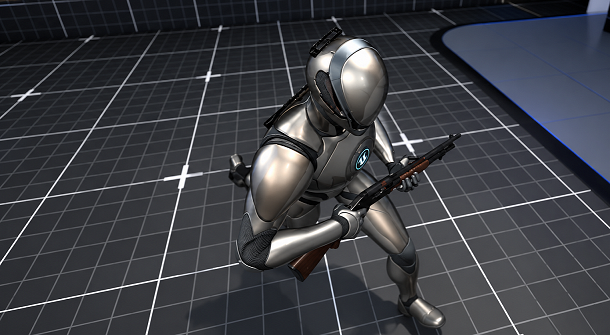
New Feature v0.6 – Hybrid Strafe Locomotion!
We've been listening to your feedback and suggestions!
The player character now use strafe locomotion while walking and automatically switch to orient-to-movement when running, similar to Resident Evil Remakes.
We've also added smooth camera transitions! When running, the camera smoothly pulls back to give a better view of the character, especially when running toward the camera. When returning to walking or idle, the camera smoothly moves closer again.
Check out this short preview video to see it in action!
Please make this feature optional for users. I wouldn’t want to use this style.
Topic starter
04/11/2026 10:33 am
@rozhkovskyproduction Yes, the Combine System is currently in development. As for the feature that makes the character rotate toward the movement direction, it will likely become optional, although we still need to look into it further.
RozhkovskyProduction reacted
04/11/2026 2:22 pm
@hosna In my project, I’m using a chest‑mounted flashlight in the SH2 style. Turning the character towards the camera while running will cause the flashlight to shine behind the character, which is absolutely not what I want.
You’re recreating mechanics from two completely different games — that’s cool. But it’s important to separate them and make individual functions optional, otherwise they might contradict each other.
1. When choosing the SH2 inventory style, do you leave the option to use a trader?
2. What will the UI look like when we need to select bolt cutters while breaking into a door chain?
Topic starter
05/11/2026 12:52 pm
@rozhkovskyproduction Yes, I completely understand your point! We're gradually working toward making systems that differ from one another optional, just like the inventory styles... This way, developers can choose which systems they want to use, with some options also changing the UI and interactions accordingly.
Regarding your questions, these details are still being evaluated, and we'll share more information later... However, keep in mind that certain systems may not be available when using the Silent Hill-style inventory, particularly those that don't naturally fit with that inventory style.
RozhkovskyProduction reacted
05/11/2026 4:05 pm
@hosna Great, I’ll be waiting for updates from you. I’m really glad you did this. I personally haven’t seen any SH‑style framework in any competitive framework on the marketplace. This is clearly something that will make your project stand out. The work is very challenging because you’ve taken two legendary games and recreated their mechanics. I want you to succeed and for the framework to be as high‑quality as possible. Good luck!
Hosna reacted
Page 2 / 2
Prev