Notifications
Clear all

Topic starter
02/02/2026 7:09 pm
Welcome, and thank you so much for supporting the Modern Survival Horror framework 🙏
I really appreciate it.
This is the main support topic for general questions, setup help, and discussions related to the Modern Survival Horror Framework.
If you run into questions while using the framework, need clarification on how something works, or want to discuss anything more broadly about the framework, feel free to ask here.
To keep the forum clean and easy to navigate, please use the appropriate sections for the following:
-
Bug reports → Bug Reports section
-
Feature requests/suggestions → Feature Requests section
-
Off-topic discussions → Community section
📘 Documentation & Tutorials
Documentation:
👉 [MSHF Documentation]
Video Tutorials:
👉 [Tutorial Playlist]
Latest Patch Notes:
👉 [Patch Notes]
Thanks again for your support, and welcome to the Dark Silver Games community.
I’m glad to have you here.
— Farshad
Dark Silver Games
Hosna and TechnicalTeam reacted

24/02/2026 3:33 pm
I've been close to finishing the project using the template, but there's an error that has been bothering me. Whenever I pick up ammo or herbs and then press 'Escape' to exit the play session, I get this error: 'Blueprint Runtime Error: "Accessed None trying to read property CallFunc_GetStorageBox_ReturnValue". Node: Branch Graph: AddItemToInventory Function: Add Item to Inventory Blueprint: AC_Inventory'.
I've checked the Blueprints and the error doesn't show up as a compiler error itself. I also added the animations to everything, so I'm not sure where the issue is centered. I need some help!

24/02/2026 6:23 pm
I've been close to finishing the project using the template, but there's an error that has been bothering me. Whenever I pick up ammo or herbs and then press 'Escape' to exit the play session, I get this error: 'Blueprint Runtime Error: "Accessed None trying to read property CallFunc_GetStorageBox_ReturnValue". Node: Branch Graph: AddItemToInventory Function: Add Item to Inventory Blueprint: AC_Inventory'.I've checked the Blueprints and the error doesn't show up as a compiler error itself. I also added the animations to everything, so I'm not sure where the issue is centered. I need some help!
You probably don’t have BP_StorageBox actor placed in your level. Make sure it’s added to your level; that error means the function can’t find a valid Storage Box reference.
Add it and test again If it still happens, let me know and we’ll sort it out!

25/02/2026 10:44 pm
I don't like how the notes and general inspection system works in the first person view, since the tweaks I made in my former project looked pretty good.
Can you please explain how to reset / what is there to change to still use the inspection camera / view with the third person mesh instead of these blank item inspections you have in the FPS view?
I guess there are just some booleans checking if I ticked FPS in the game instance but I need to know which ones these are.
The goal is to completely get rid of the first person inspection and use the original inspection system - including the Third Person mesh holding these items.
When it comes to smaller interactables such as ammo and others, I know there were grabbing animations for these. I would also need to know where this is set up so I can link my first person grab animations correctly.
Farshad reacted
Topic starter
25/02/2026 10:49 pm
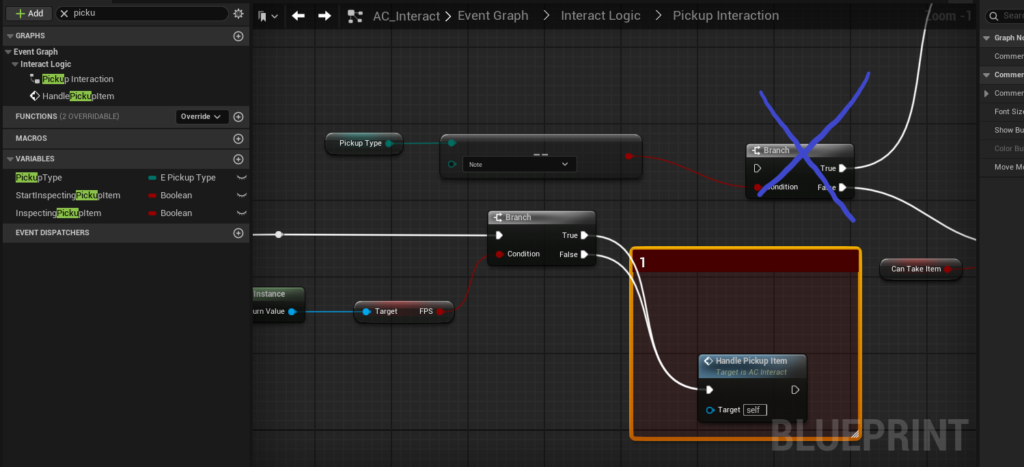
@contracultist I completely understand. You can ignore the True branch(Image attached) in the Pickup Interaction graph inside AC_Interact and use your own logic, or you can connect it to the lower branch so it works like the third-person setup. If you do this, the first-person inspection mode will be ignored. For the notes, once you’ve implemented your own animation, you can apply your custom behavior as well.
This post was modified 3 weeks ago 3 times by Farshad
ContraCultist reacted
25/02/2026 11:21 pm
@farshad This already worked easily, just couldn't find the right bool, so thank you. Much appreciated.
Concerning the handling of using the different camera, it seems like now that the input of the 'Pickup Interaction' graph is directly linked to 'Handle Pickup Item', the item is just added to the inventory, no matter what type of item it is.
I tried to look into a fresh project but it seems like I am missing something.
How do I switch between the FP camera and the 'PickupCamera' inside of the BP_Character? The goal was to use this camera while enabling the visibility of the TP mesh /disabling the FP mesh, so I restore the former item inspection of the Third Person Mode.
Help in this matter would be much appreciated, thank you in advance for your time!
Topic starter
26/02/2026 3:12 pm
Thank you for your question. I tested the feature you requested, and was able to implement it successfully. Please watch this video, and if this matches what you want, make sure to create a backup first and then follow the steps below.
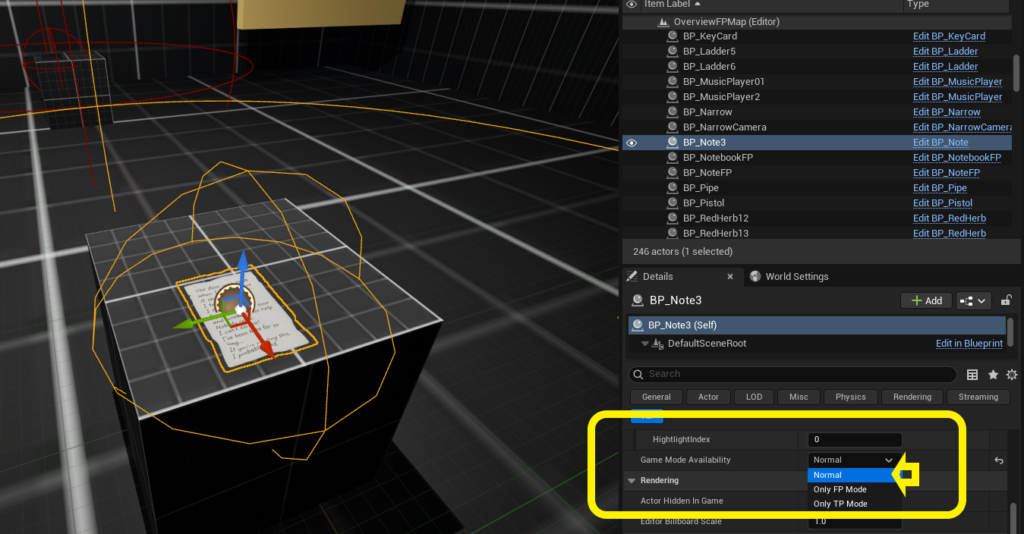
1 - First, in the BP_Note placed in your level, make sure the GameModeAvailability is set to Normal. Otherwise, it will not be active in First Person mode.
Spoiler
Image
2 - Next, as explained in my previous message, connect the True branch in the Pickup Interaction graph to the HandlePickupItem function.
Spoiler
Image
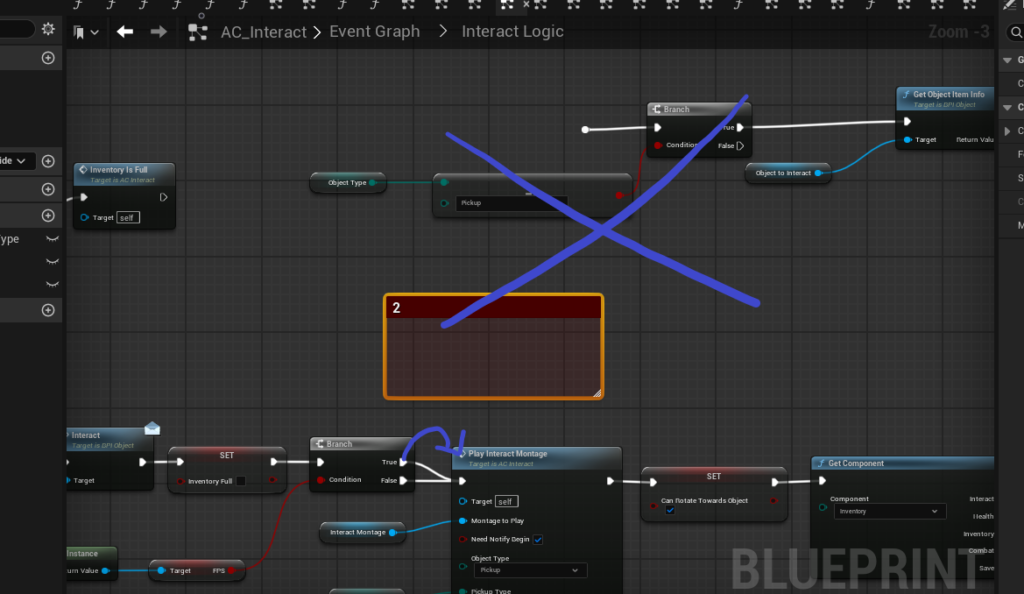
3 - Then open HandlePickupItem, and further ahead, connect the True branch again to PlayInteractMontage, as shown in the image.
Spoiler
Image
4 - Now open PlayInteractMontage, and after the switch node, call UpdatePerspectiveMode from the Player class with the input set to False.
Spoiler
Image
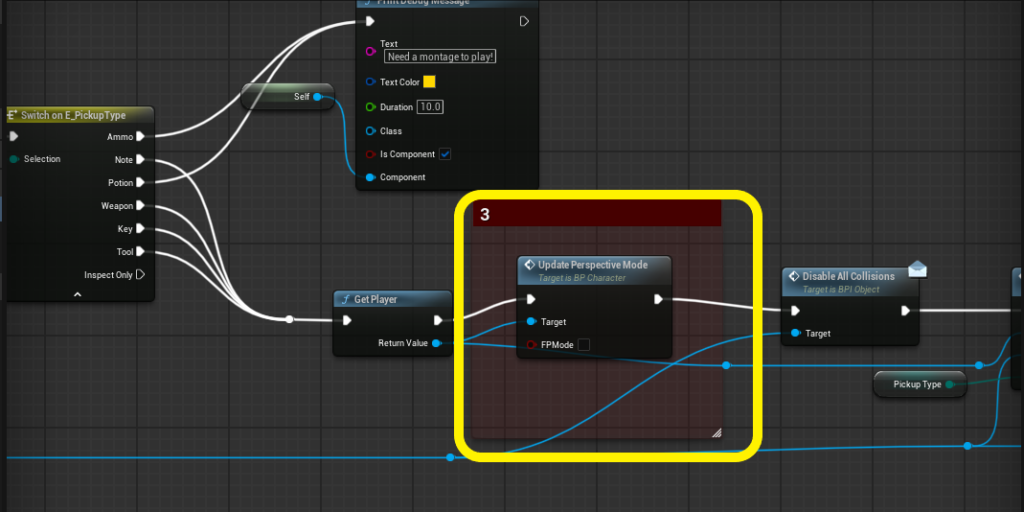
5 - Finally, go to the custom event EndInspect, and after PlayMontage → OnNotifyBegin, call UpdatePerspectiveMode again, this time with True, to switch back to First Person mode.
Spoiler
Image
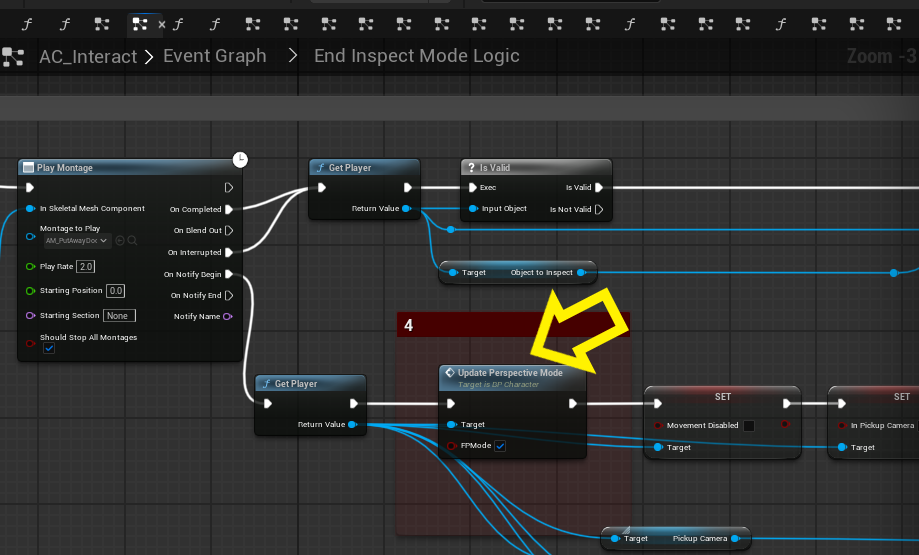
Note 1: This is a shortcut solution specifically for your case and is not the official workflow.
Note 2: These changes will provide the requested feature and have not tested for everything, but they may affect other parts of the system, so please keep that in mind.
If anything is unclear or you have questions, feel free to ask 🙂
This post was modified 3 weeks ago 3 times by Farshad
ContraCultist reacted
26/02/2026 10:03 pm
@farshad So, I tested your workflow and this works pretty well. Still, I noticed an issue in your code, preventing from correctly updating the FP mesh after picking up an item. In 'UpdatePerspectiveMode', at the end, there is the 'Set Visibility' node missing, which should be connected to 'FP_Mesh' in targets and set to 'New Visibility'.
That way, it updates the mesh after a successful pickup.
Farshad reacted
Topic starter
26/02/2026 10:20 pm
@contracultist Yes, that’s correct, that node should normally be there. It was probably removed by mistake. Thanks for pointing this out.
ContraCultist reacted
27/02/2026 8:54 pm
I'm so sorry, I don't know if this is somewhere deep in the documentation but I just couldn't find it.
I am looking for a way to edit the target for specific montages. With the setup you helped me with, the inspection through the third person model became possible (thanks a lot for that once again). Still, for smaller items without much text (such as ammo, herbs and other stuff) I would like to play a montage with the FPS arms though.
I figure this has to do with the Pickup_Type Enum, since it would make sense to tie camera logic as well as animation logic to it, but I don't get how I could use this to define when to use the TPS mesh and when the FPS mesh.
Another thing I need to know in relation to this 'issue' would be if I can set these montages to blend to a specific extremety. To be precise, I often want interactions for doors and smaller items to only play on the left arm/hand, so the dominant right hand can still hold weapons.
This would make the game look more realistic instead of always blending out the idle/walk animation of the weapon just to show an unarmed interaction state.
Covering this would be much appreciated, thank you very much in advance!
Topic starter
27/02/2026 9:07 pm
@contracultist Thank you for your message. With the changes you’ve made based on my previous post, item pickups are now handled through the third-person system for all items.
However, for items like ammo and health, you’ll need to create a left-hand animation for first-person mode. In the PlayInteractMontage custom event, where the PlayMontage node is currently used for the third-person mesh, you can use that as a separate setup for first-person mode as well. Then, create and assign a left-hand pickup animation specifically for the first-person mesh and then in its Anim BP, add a default slot for the left hand and use Layered Blend Per Bone, setting the bone to clavicle_l. This way, the pickup animation will only affect the left arm. Hope this helps 🙂

01/03/2026 11:34 pm
Hello!, i have this problem with inspecting items in the inventory, the render to texture works correctly in one level but it shows a white screen (over expose) on another. Digging a little bit i find the problem was ultra dynamic sky (on the level where the inspect works correctly there is no UDS), so changing the intensity of the sun light fixed the issue, is there a way to compensate the exposure on the inspect windows, so i don't have to change UDS?, thanks for the help.
Hosna reacted
02/03/2026 10:22 am
Thank you for bringing your issue to our attention 🙂
To resolve your issue, you need to create a fully black Unlit material
Spoiler
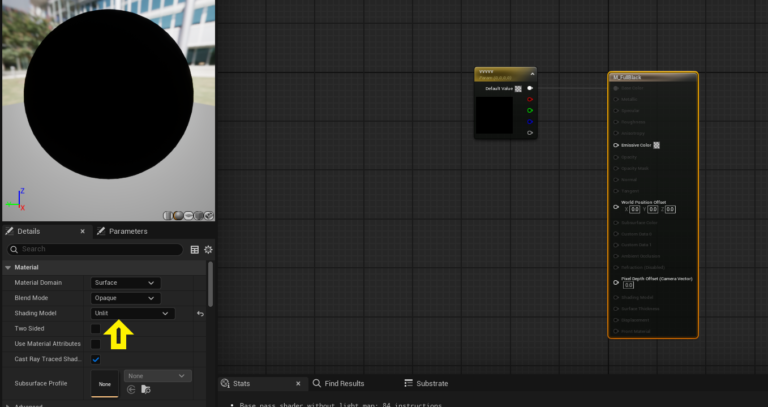
Then, go into the BP_InspectStudio actor and add a Cube with a scale of 500. Apply the material you created to this Cube.
Spoiler
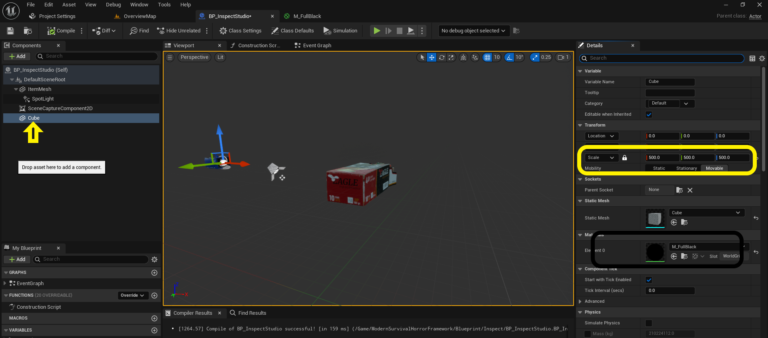
Next, select the SceneCaptureComponent2D, set Primitive Render Mode to Use Show Only List, and in Blueprint, get the SceneCaptureComponent2D and use the Show Only Component node to add both the Cube and your Item Mesh.
Spoiler
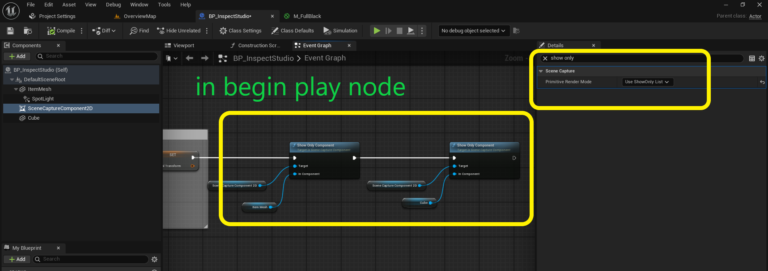
Now the inspection system will work independently of the environmental lighting 👍 If you find that the lighting inside BP_InspectStudio is not sufficient, you can replace it with two Rect Lights, one in front of the item and one behind it.
If you have any questions, feel free to ask!
This post was modified 2 weeks ago 5 times by Hosna
Farshad reacted
Page 1 / 4
Next
